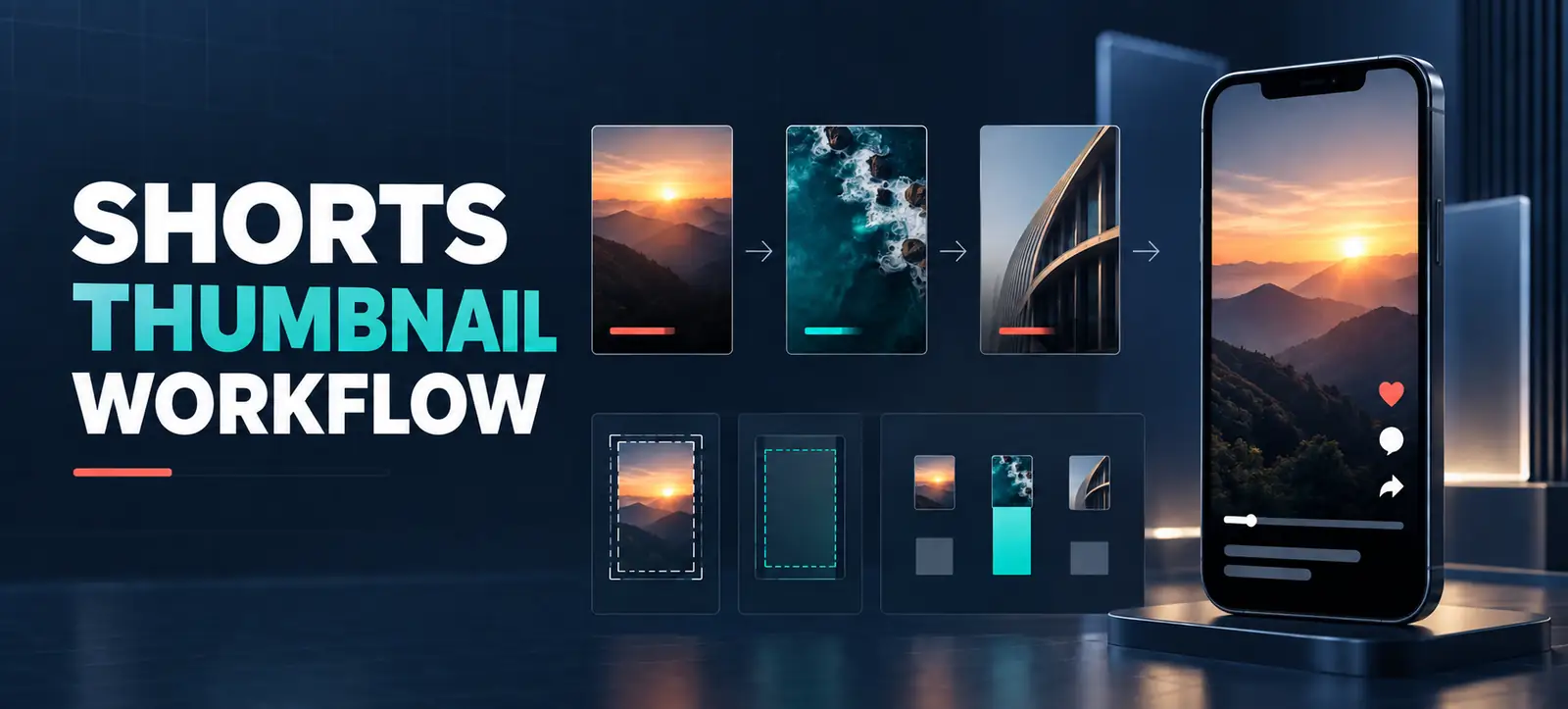
YouTube Shorts custom thumbnails give eligible creators more control over how short-form videos appear beyond the swipe feed. The change is useful for brands that want a consistent channel page, clearer video promises and more recognisable creative. It is not a shortcut to reach, however. A thumbnail can earn attention only when the Short itself satisfies the expectation it creates.
In July 2026, YouTube announced that creators in the YouTube Partner Program could start uploading custom thumbnails for Shorts, with access expanding over time. YouTube also added three suggested frames on desktop, while mobile still lets creators choose a frame from the video. This guide turns that product update into a practical workflow for marketing teams.
What changed for Shorts creators?
The important change is the ability to upload a separate vertical image for a Short in YouTube Studio on a computer. YouTube’s current help page says the account must be verified and recommends a 9:16 image. Availability can still depend on eligibility and rollout, so check the interface on the channel instead of assuming every contributor has access.
There are now three workable options: upload a custom thumbnail when available, select one of the suggested frames on desktop, or choose a suitable frame in the mobile app. YouTube’s official announcement explains the rollout, while the custom-thumbnail help page provides the current upload steps and technical guidance.
Where thumbnails can influence discovery
Shorts are often discovered in a continuous vertical feed, where the opening frame and first seconds remain critical. A custom image can matter more on surfaces where viewers compare several videos, including channel pages, search, watch history and some non-mobile experiences. YouTube notes that display treatment can vary by surface; for example, a vertical video may receive an automatically generated crop in some locations.
That means teams should not evaluate a thumbnail as if it were a universal cover image. Preview it at different sizes and protect the central subject from cropping. For wider context on interpreting short-form performance, review Kayaar’s guide to YouTube engaged views. A higher view count alone does not prove that a thumbnail attracted qualified attention.
Choose the right thumbnail method
Method
Best use
Main risk
Quality check
Custom 9:16 image
Campaign series and branded education
Promise does not match the video
Check crop, contrast and accuracy
Suggested desktop frame
Fast publishing with limited design time
Weak expression or cluttered frame
Select the clearest of the options
Mobile-selected frame
Creator-led, mobile-first production
Inconsistent branding across a series
Confirm text and subject remain legible
A six-step brand workflow
Confirm eligibility. Verify the channel, then open YouTube Studio on a computer and inspect the Thumbnail area for the Short. If upload is unavailable, use a selected frame and revisit access later.
Define one promise. Write a short statement describing what a viewer will learn, see or decide. The visual should support that promise without adding a second message.
Build for vertical display. Create at 9:16, use one dominant subject and keep essential text away from edges. YouTube recommends 2160 × 3840 for Shorts, with a minimum height of 640 pixels.
Limit the words. Use a few large words only when they add context that the image cannot. Avoid repeating the full title or hiding the subject behind copy.
Check truth and policy. Confirm that the image represents the actual video and follows Community Guidelines. Sensational imagery may win an initial click while damaging retention and trust.
Publish and document. Record the chosen image, publication date, creative concept and expected outcome. This creates evidence for future creative decisions.
A repeatable brief keeps production efficient. Kayaar’s creative brief workflow can be adapted for a Shorts series by specifying the audience, hook, proof, visual subject and action. If the content follows a recurring visual format, the lessons from the YouTube desk setup trend also show why recognisable details should support—not replace—a useful idea.
Measure the thumbnail without overclaiming
Do not attribute every change in Shorts views to the cover image. Distribution, opening hook, audience fit, completion, rewatches and publishing context can all change at the same time. Compare similar Shorts over a meaningful period and annotate thumbnail changes. Look at discovery surfaces, engaged views, audience retention, subscribers gained and the business action that follows.
Where YouTube provides impression and click data for the relevant surface, review it with retention. A promising pattern is stronger discovery without an immediate drop after the opening. A warning pattern is more starts followed by weak retention, which can indicate that the thumbnail overpromised. For monetised channels, keep the wider requirements in view with Kayaar’s YouTube Partner Program checklist.
Use a simple test log rather than drawing conclusions from one post. Compare videos with similar topics, length, audience and publishing conditions. Record the thumbnail version before changing it, allow enough time for normal viewing patterns to develop, and note external promotion. If results are mixed, protect audience trust and choose the clearest accurate design.
Common mistakes to avoid
Designing a horizontal cover and assuming every vertical surface will preserve it.
Using several small objects, long sentences or low-contrast type.
Copying another creator’s visual identity instead of building a recognisable system.
Changing the thumbnail and video hook together, then claiming one caused the result.
Optimising for curiosity while ignoring relevance, retention and conversion quality.
A useful thumbnail system should reduce creative decisions, not add bureaucracy. Start with two or three templates, define safe areas and accessible contrast, then allow the main image and promise to change. Review the system monthly. For help connecting creative testing with wider acquisition goals, contact Kayaar.
FAQs
Who can upload YouTube Shorts custom thumbnails?
YouTube says verified creators with access can upload them in YouTube Studio on a computer. The July 2026 announcement initially highlighted YouTube Partner Program creators and said availability would expand, so check the channel interface.
What size should a Shorts thumbnail be?
YouTube recommends a 9:16 image at 2160 × 3840 pixels, with a minimum height of 640 pixels. Keep essential subjects and words away from the edges because presentation and cropping can vary by surface.
Can I upload a custom Shorts thumbnail on mobile?
YouTube’s current help guidance says custom image uploads for Shorts are available in YouTube Studio on a computer. The mobile app can still be used to select a frame from the Short.
Will a custom thumbnail increase Shorts views?
Not automatically. It may improve clarity on discovery surfaces, but reach also depends on the opening hook, relevance, retention and audience response. Compare similar videos and review downstream quality, not views alone.
Should every Short use the same thumbnail template?
Use a consistent visual system rather than an identical cover. Keep typography, colour and safe-area rules stable while changing the main subject and promise so each Short remains distinct and accurate.