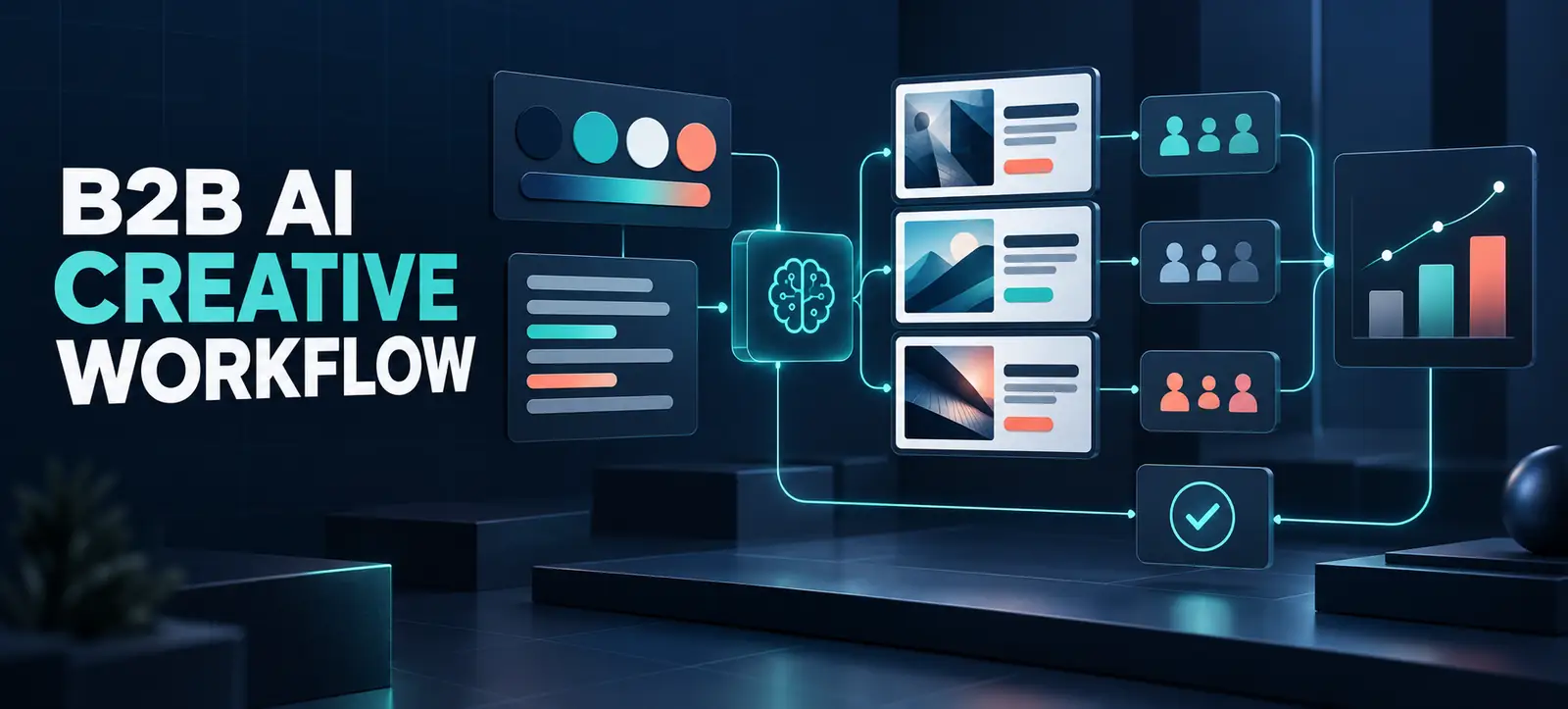
LinkedIn Ads AI creative tools can shorten the journey from a campaign idea to a structured set of B2B ad variations. LinkedIn now groups capabilities such as Brand Kit, Draft with AI, AI ad variants, ad personalisation and flexible ad creation into a broader creative workflow.
The opportunity is speed, but speed needs control. Generating more headlines does not create a strategy, and automated combinations can produce weak learning when audiences, offers and success measures are unclear. This guide shows how to use the tools as production support while keeping positioning, approvals and testing decisions with the marketing team.
What LinkedIn’s creative tools do
LinkedIn’s official product overview describes a connected set of tools for small and growing businesses. Brand Kit stores inputs such as colours, fonts, logos, tone and key messages. Draft with AI uses the advertiser’s URL, campaign goal and supplied context to suggest copy and creative. AI ad variants generate alternative headlines and introductory text from an existing ad.
Ad personalisation can adapt messaging using professional attributes, while flexible ad creation mixes supplied images, videos and copy into combinations and shifts delivery as performance signals emerge. LinkedIn’s current AI advertising best practices still places responsibility on the advertiser: creative should be useful, relevant and authentic rather than generic or repetitive. Feature availability may vary by account, campaign setup and rollout.
Start with a testable creative brief
Do not open an AI drafting tool with only a landing-page URL. First define the audience, business problem, offer, proof and desired action. Select one variable to learn about, such as pain-point framing, benefit emphasis or evidence type. If every headline, image and call to action changes at once, the team may find a winner without understanding why it worked.
A concise brief should include approved claims, prohibited language, legal conditions and a clear destination. Kayaar’s creative brief workflow provides a useful starting structure. Adapt it for B2B by adding buying role, company context, sales-stage intent and the objection the ad must resolve.
Choose each tool for the right job
Tool
Best use
Human check
Brand Kit
Consistent visual and verbal inputs
Current assets, tone and permissions
Draft with AI
A structured first draft
Claims, relevance and factual accuracy
AI ad variants
Testing distinct message angles
Meaningful differences between versions
Ad personalisation
Relevant professional context
Natural wording and appropriate use
Flexible ad creation
Scaling approved asset combinations
Every possible pairing makes sense
A seven-step testing workflow
Confirm the objective. Choose the business result and campaign objective before producing variations. Decide which downstream event represents quality.
Build the input pack. Gather the landing page, brand rules, approved claims, customer evidence, existing top performers and negative examples.
Create a controlled draft. Use Draft with AI for options, not final copy. Remove unsupported superlatives, repeated phrases and vague promises.
Define the hypothesis. State what one creative angle is expected to change and for which audience. Keep variants different enough to create a useful comparison.
Review all combinations. If using flexible creation, test every headline, visual and call-to-action pairing. A good component can become misleading beside the wrong image.
Approve before launch. Assign brand, product and compliance owners. Record who approved the copy and when source claims were checked.
Measure beyond clicks. Review click-through rate with landing-page engagement, lead quality, opportunity creation and cost. Do not scale a curiosity-driven winner that produces weak prospects.
The same review discipline applies across advertising platforms. Kayaar’s Google Ads AI labels guide shows why teams should distinguish generated suggestions from automated decisions. For visual consistency, the YouTube Shorts thumbnail workflow also demonstrates how safe areas, simple messaging and accurate promises support recognition.
Design variants that teach you something
Begin with three to five concepts built around different reasons to care. One might lead with a costly problem, another with a practical outcome, and a third with credible proof. Avoid variants that merely swap a synonym. Each version should express a clear hypothesis that can inform the next production cycle.
Keep the offer and landing page stable during an early message test. Use a consistent naming system such as audience-angle-format-version. Save the source prompt or inputs, generated draft, final edit and approval note. This makes later reporting more useful and prevents teams from accidentally relaunching rejected language.
Protect brand and factual quality
Brand Kit can reduce inconsistency, but it cannot judge whether a claim is appropriate for a particular audience or market. Review numbers, customer quotations, product availability, comparative statements and time-sensitive details against an approved source. Check that personalisation reads naturally and does not imply knowledge the brand should not appear to have.
Agent-style workflows need the same guardrails. Kayaar’s AI agent brand-readiness checklist explains how source materials, permissions and escalation rules can be prepared before automation expands.
Use a practical measurement scorecard
Separate early creative signals from business outcomes. Impressions, click-through rate and cost per click help diagnose attention. Landing-page engagement and form completion test message continuity. Qualified leads, opportunities and revenue indicate commercial value. Agree on minimum sample and review periods before launch instead of stopping a variant after a handful of clicks.
Record spend and delivery by variant because uneven exposure can distort conclusions. Note audience changes, bids, budgets and landing-page releases. When a winner emerges, write what was learned and which element should be tested next. Do not assume the same result will transfer to another market, role or funnel stage.
Common mistakes to avoid
Generating many near-identical ads without a hypothesis.
Allowing an AI draft to introduce unsupported claims or invented proof.
Personalising so aggressively that the message feels intrusive.
Mixing incompatible assets in flexible combinations.
Choosing winners on clicks while ignoring qualified pipeline.
A strong AI creative workflow produces faster learning, not simply more files. Start with a focused brief, generate controlled options, apply human review and measure the full journey. For help connecting creative tests to a broader digital marketing plan, contact Kayaar.
FAQs
What are LinkedIn Ads AI creative tools?
They include capabilities such as Brand Kit, Draft with AI, AI ad variants, ad personalisation and flexible ad creation. They support creative production and testing, while advertisers remain responsible for strategy, accuracy and approval.
Should AI-generated LinkedIn ads be published without editing?
No. Treat generated content as a draft. Check facts, claims, tone, brand consistency, legal requirements, visual rights and the relationship between the ad and its landing page before launch.
How many LinkedIn ad variants should a test use?
Use enough distinct variants to test a clear hypothesis without spreading the budget too thin. Three to five controlled concepts can be a practical starting point, but the appropriate number depends on audience size, budget and expected volume.
What should a LinkedIn creative test measure?
Review attention metrics alongside landing-page behaviour and qualified business outcomes. Click-through rate alone can reward curiosity, so include lead quality, opportunity creation, cost and revenue where the data is available.
Can every account access all LinkedIn AI creative features?
Availability may vary by account, ad format, campaign setup and product rollout. Check the options shown in Campaign Manager and LinkedIn’s current help documentation before designing a process around a specific capability.